Examples
Each file in
example/
runs on its own on a physical device (simulators have no usable front
camera):
| Example | Shows | Run from example/ |
|---|---|---|
| Minimal | The getting started steps, in ~90 lines | flutter run |
| Branded fintech KYC flow | A complete, fully custom-designed verification flow (more below) | flutter run -t lib/recipes/fintech/main.dart |
| Custom UI | Your own overlay and instructions, with detection following your window | flutter run -t lib/recipes/custom_ui.dart |
| Controller | Your own Cancel / Try again buttons and live state | flutter run -t lib/recipes/controller.dart |
| Server-bound | A challenge from your backend, then upload with error handling | flutter run -t lib/recipes/server_bound.dart --dart-define=BACKEND_URL=https://… |
| Test bench | Every option behind a settings screen, for trying the package on a device | flutter run -t lib/test_bench/main.dart |
Clone the repository to get the example with its Android and iOS folders
ready: git clone https://github.com/maykhid/liveness_flutter && cd
liveness_flutter/example. (The copy on pub.dev leaves the platform
folders out; the
example README
explains how to generate them.)
A fully branded KYC flow
example/lib/recipes/fintech/
shows how far customization goes: a complete "upgrade your account"
verification flow, the way a mobile bank or fintech app would ship it,
built for a fictional brand ("AcmePay"). None of the package's default UI
is visible — only its detection.
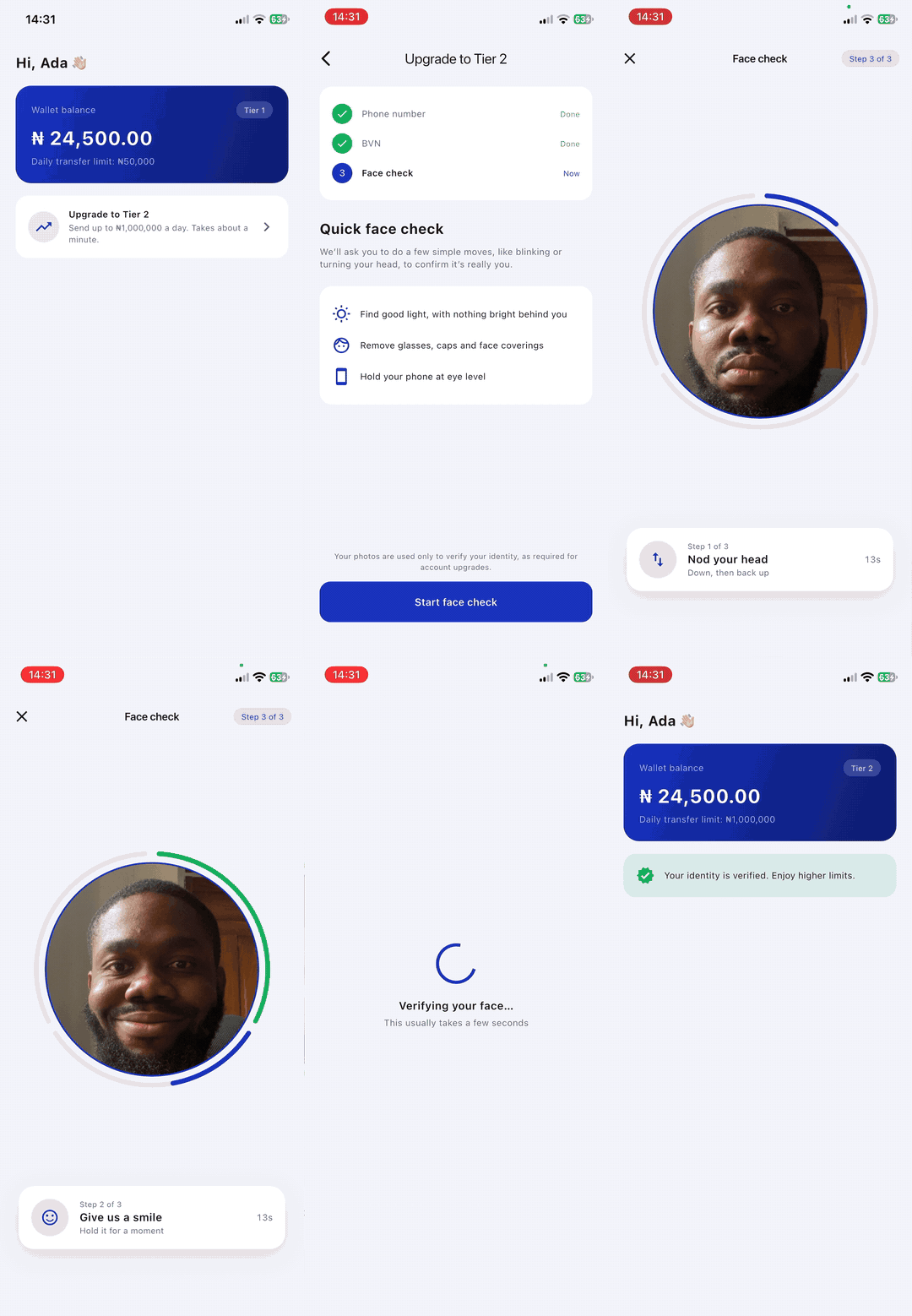 The full flow on an iPhone.
- Account home — balance card, current tier, "Upgrade to Tier 2".
- Intro — where the user is in the upgrade (phone ✓, BVN ✓, face check), tips for passing first time, and what the photos are used for.
- Face check — a light screen with a circular window, a progress ring
split into one segment per action, and a card with an icon, the current
step, a hint that turns red when something needs fixing, and a
countdown. The circle is passed as
targetRegion, so the face must be inside what's drawn. A branded page handles denied camera access. - Verifying → success or failure — success unlocks Tier 2; failure
explains what went wrong for each
LivenessFailureReasonand offers Try again.
Run it:
Make it yours: everything brand-specific — name, colors, wording,
which actions it asks for — is in
brand.dart.
Change primary to your color and hot reload. The "Verifying" step
simulates your backend's approval: replace _serverApproves in
outcome_screens.dart with your upload and your server's decision.